.png?width=150&height=65&name=B4C-Logo-Stacked-2-colour@4x%20(1).png)
Also Known As / Common Questions
- "How do I access the curriculum for my Human Intelligence Certification?"
- “How do I access my coursework for the Breathe for Change training?”
- "Where do I find the link to log into my training curriculum?"
Overview
Your program's curriculum is housed on a 3rd party platform called Mighty Networks.
If you are a member of the Breathe for Change Educator Collective, hosted on Mighty Networks, or have completed a training program with Breathe for Change previously, you most likely already have an account.
The first step to accessing your coursework is to log into or create your account.
Access Your Curriculum in Mighty Networks
The link to log into your program's curriculum is included in your “Welcome Email”.
If you need help locating this email, search for one of the following subject lines:
- Welcome to the Human Intelligence Certification 🌟
- Welcome to the Mindfulness, SEL, and Yoga Teacher Training!
- Welcome to the B4C Transformative TEACHing and Leadership Training!
If you already have an Educator Collective account, click the link and "sign in" using your existing credentials. Your program's course will appear in the menu on the left side of the page.
If you do not already have an account, we have created one for you. Click the course access link in your email and your program's course will appear in the menu on the left side of the page. Note: you will need to set up a password after you log in. Instructions on how to do so can be found here.
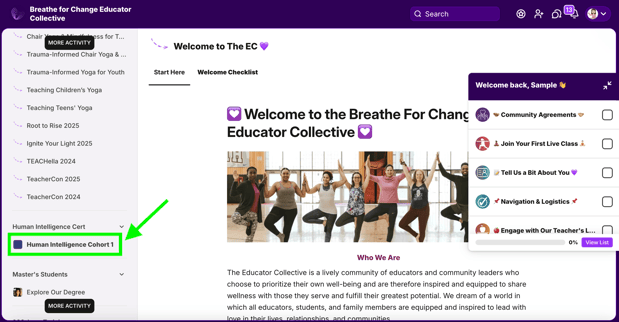
Once you are logged in, you can review this article for curriculum navigation tips.
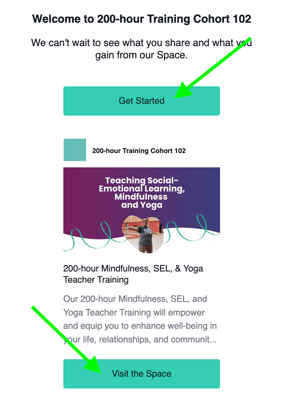
Note: You will also receive an email from Mighty Networks with a link to access your course. Click on either the "Get Started" or "Visit the Space" button to log in. Either link will take you directly to your program's curriculum space within the Educator Collective platform.
Set up a Mighty Networks Password
If you are a new member, once you are logged into your Mighty Networks account we recommend that you create a password.
Step 1: Click on the person icon in the top right corner of your screen.
Step 2: Select Personal Settings from the drop down menu.
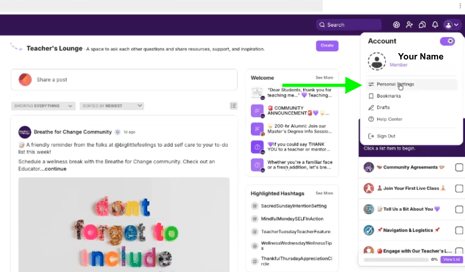
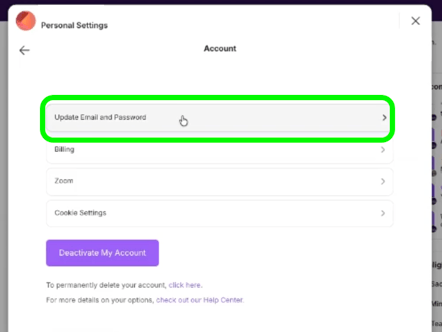
Step 3: Click on Account
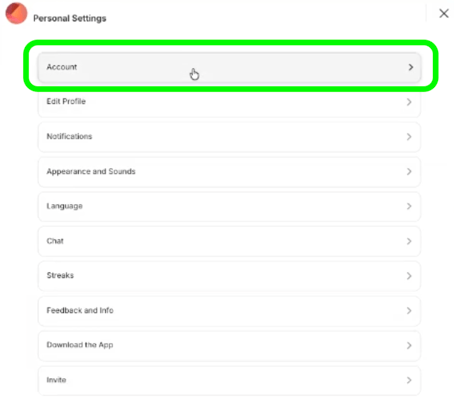
Step 4: Select Update Email and Password
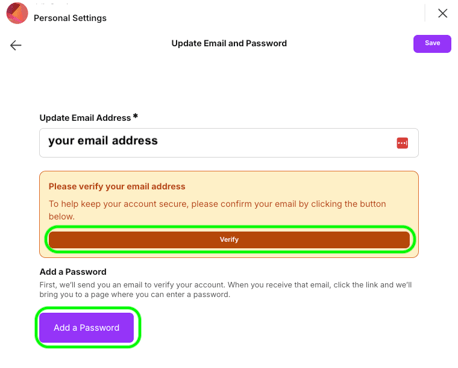
Step 5: Verify your email and Add a Password.
Click the Verify button to have a verification email sent. Then, click the Add a Password button to set up a password for your account.
Mighty Networks FAQs
Does Mighty Networks have app access?
We recommend accessing your curriculum space in Mighty Networks via a browser. Although it is possible to access via the Mighty Networks app, generally the curriculum is more accessible through the browser.
If you are having trouble opening your cohort's curriculum from the app, first try from your browser and then attempt from the app using your same log in.
Sometimes Mighty Networks will have you request approval when creating a new login. This is because we keep our network private to help keep our community safe from harm (spam, stalkers, phishing, soliciting, etc.). Please know that you will not have to wait long — we check approvals multiple times per business day!
I am a student and I have access to my coursework in the Educator Collective but I cannot see the live classes or class library on the left side where my menu is. When I click on it, it tells me I have to finish setting up payment. How do I get access for free as a student?
You will need to activate the free one year trial by choosing your billing frequency (monthly or annual) and entering your credit card information. You will not be charged until your free trial has ended. You can absolutely cancel your membership before your subscription renews if you do not wish to have continued access to the Educator Collective after your trial ends.
More information about accessing your exclusive free trial can be found here: Breathe for Change Educator Collective.
I am not receiving the verification email from Mighty Networks so I am unable to verify my account and join.
This is likely due to previously unsubscribing from Mighty Networks emails. There are two ways to resubscribe:
Option 1: Resubscribe through an old email from Mighty Networks
Search for "Mighty Networks" in your inbox. If you do not see any emails from Mighty Networks in your inbox, you may need to look in your spam or promotions folders.
Scroll to the bottom of the email to update your subscription status.
Once you are resubscribed, attempt to join again and check for the verification email.
Option 2: Email Mighty Networks
If you are unable to locate a previous email from Mighty Networks, reach out to chat@mightynetworks.com. They will help you resubscribe on their end.
I am locked out of my Mighty Networks account. How do I reset my password?
If you need support with logging into your Mighty Networks account, including resetting your password, email chat@mightynetworks.com.
How long will I have access to my training curriculum after graduation?
As a Breathe for Change graduate, you will have access to your online curriculum indefinitely after completing your program. More details about this can be found in the Live Session and Curriculum Access section of our Terms & Conditions.