Also Known As / Common Questions
-
“How do I activate my free trial of the Educator Collective Membership Subscription?”
-
“Do I need to enter a credit card for my free trial?”
-
“Will I still have access to my training curriculum after the trial ends?”
Overview
Program participants and graduates may receive exclusive access to a free trial of the Educator Collective Membership Subscription.
This optional free trial offers access to subscription-only spaces within the Breathe for Change Educator Collective platform.
Important Notes
- If you've joined the platform previously, always "sign in" with your existing credentials so that you do not create a duplicate account.
- If you need to create a new account, you may need to "request to join" the platform — this is because we keep our community private to protect you as much as possible from spam and harm.
- Avoid setting up duplicate payment plans. If you already have a different paid membership subscription active, cancel it before starting a new trial to avoid duplicate subscription charges. More information can be found here: Educator Collective Membership Subscription Cancelation.
- The same trial plan can only be used once. If you've joined more than one Breathe for Change program over time, you can only use the same trial offer one time. If you cancel your trial before it runs out, you cannot start it again.
- If you start the free trial and decide not to continue, cancelling your membership subscription will not impact your access to previous training curriculum.
How to Activate Your Exclusive 1-Year Free Trial
Step 1: Locate and click on your free trial activation link (often within the Welcome Unit or Closing Unit of your curriculum).
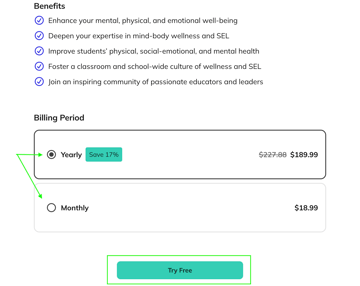
Step 2: Scroll down and select your preferred billing period: Annual or Monthly, then click the "Try Free" button. This determines how your subscription will be billed if you continue after the free trial ends.
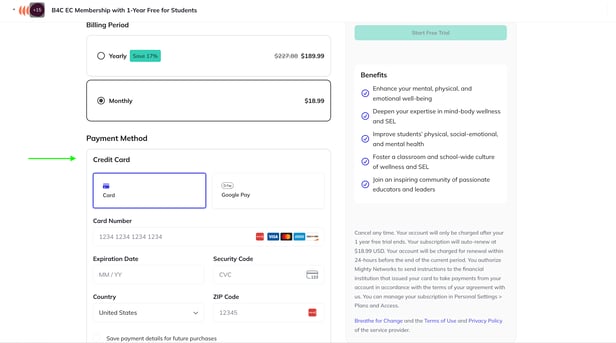
Step 3: On the next page, review your billing details, including your selected plan and when billing would begin. Scroll down to add your payment method.
💳 Note: You must enter your credit card information to activate a free trial. You will not be charged during the trial period.
Step 4: Scroll back up to review your billing details, including when your next billing date will be. The "Total Due Today" should be $0. If there is a higher total due today, that means you've already used the trial.
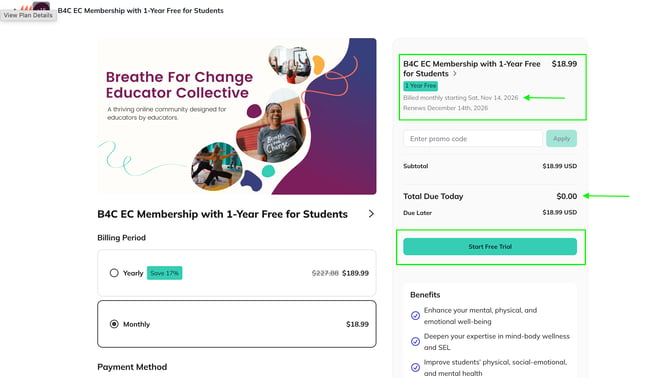
Step 5: Click on the “Start Free Trial” button to activate your trial.
Step 6: Access membership-only Educator Collective spaces. When you have successfully activated your free trial, you will gain access to additional spaces within the Educator Collective, such as ...
- Live yoga and meditation classes in the "For Educators" section
- SEL curriculum and plug-and-play videos in the "For The Classroom" section
- Mini-courses such as "Introduction to Chair Yoga for Educators" and "Teaching Teens Yoga" in the "Professional Development" section
What Happens After the Trial Ends
-
You will receive a reminder email from Mighty Networks before your first billing date. The email will be sent from breatheforchange@mn.co.
-
Your account will automatically renew unless canceled; charges occur within 24 hours before the end of your trial period.
-
To view and/or cancel your subscription plan, click the arrow in the top right corner of the Educator Collective platform, then select Plans and Access. More information can be found here: Educator Collective Membership Subscription Cancelation.
-
We recommend setting a calendar reminder one week before your trial ends to decide whether to continue or cancel your subscription before you are billed.
FAQs
When does my free trial end?
To determine when your trial will end, access Personal Settings > Plans and Access.
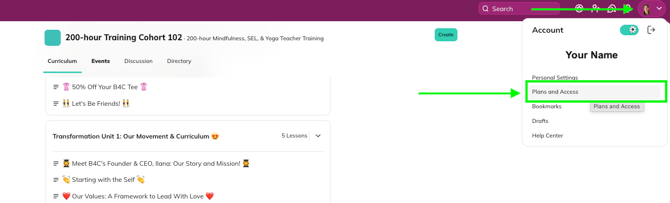
Under the Upcoming Charges section, you will see the date that the next charge is scheduled to process.
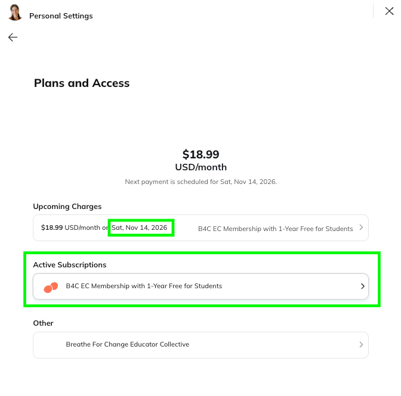
You can also locate the "Next Billing Date" by clicking on the plan under "Active Subscriptions." To avoid being billed, be sure to cancel your subscription at least 24 hours prior to the next billing date.
Will I lose access to previous training curriculum if I decide not to pay for the membership subscription after my free trial ends?
No. You will have indefinite access to your training curriculum, even if you decide not to continue with your paid membership subscription after the free trial period.
I can access my curriculum, but I don't have access to the additional spaces such as the Class Library or Live Classes. What do I do?
To access the class library and live classes, you must have an active membership subscription. If you used to have an active subscription, and you're not sure why it seems to have disappeared, there are two things that might have happened:
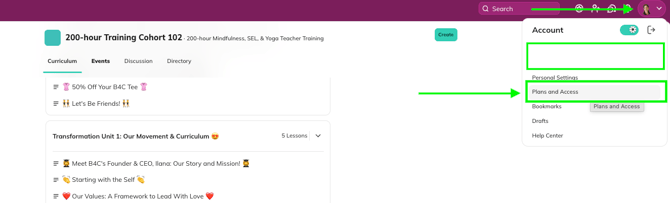
- You may have canceled the trial. you can review your past subscriptions to confirm this by going to Settings > Plans and Access to view your past plans.
- You may have accidentally created more than one login using two different emails while setting up access to different spaces within the Educator Collective.
You will not be able to use the same trial more than once, but you can begin a paid subscription if you'd like.
I’ve accidentally created two Educator Collective accounts. How do I fix this?
If you realize that you have two accounts, you’ll want to keep the login associated with the most important space access so that you don’t lose your records.
- If you have past training records saved in the platform, you might consider the account that is connected to those records as most important.
- If you have an active membership subscription plan, you might consider the account connected to that plan as most important.
You can delete the duplicate account by signing in to it, going to your Personal Settings > Account.
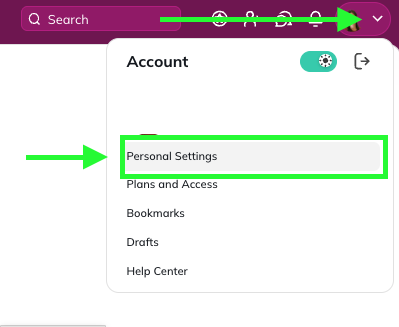
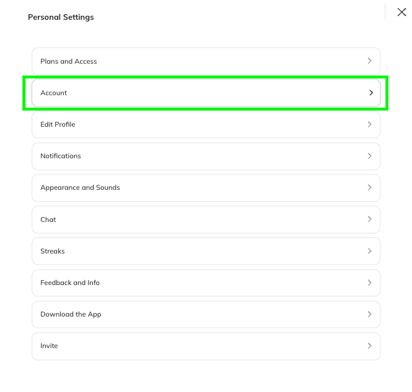
Then select the little option at the bottom in gray that says “to permanently delete your account, click here.”

From that point forward, be sure to sign in with the login that you wish to keep.
Can I change my login email?
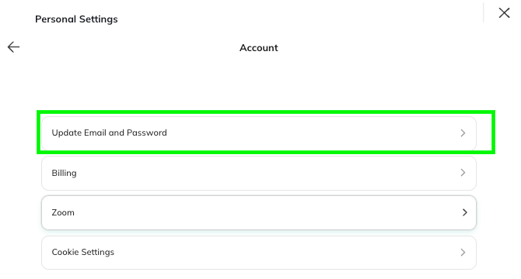
Yes, simply sign in with your current credentials, then go to Personal Settings > Account > Update Email and Password.
I forgot my password to sign in, and the forgot password process is not working. Help?
If you are trying to reset your password and the email is not coming through — or the email you used to create your account is no longer active — you will need to reach out directly to help@mightynetworks.com or chat@mightynetworks.com for assistance.
How do I cancel my Educator Collective membership subscription?
Review this article for information about how to cancel your subscription: Educator Collective Membership Subscription Cancelation.